Please at least read this, or at least the section that describes controls, or DO NOT download Mugician.
Contact me if you like Mugician, but need a build with pressure sensitivity (it's technically, "finger area" sensitivity. i have never been able to get a straight answer on whether i can just ship with it, especially now that 4.2 is out. So I don't ship with it enabled.)
Scroll to the bottom of this post for iOS4.2 issues that I have discovered (occasional sound skips,sound bug).
 It lets me know that you actually care about the project when you scream in pain when something breaks.
Disregard the ratings whether they are good or bad. All that matters is actual results. Make your judgement based on what is possible. All of these videos are unprocessed line-in (including drum tracks) recordings. You can do
--> VitalyNewmansHighQualityPlaying <--
or
---> this <---
or if metal is more your thing:
--> speedyMetal <--
or
--> slowMetal <--
with Mugician. Your instrument needs good latency/attack characteristics to make the speedy stuff work at all. You may well be a much better guitarist than me, then you can do *way* more than that with Mugician. Maybe some time in the future, you can do that with a typical iPad instrument. But not right now.
Mugician makes none of this easy; just possible! I promise that you will hate Mugician if you do not like to practice or study. I have removed everything from Mugician that could slow it down, so it's ugly and minimal for a great reason. The musicians that help me to test have an insatiable appetite for an even faster instrument. Everyone asks for more features, but the smallest amount of latency will make Mugician totally useless to good musicians!
Post 1.7 builds are being tested. It sounds roughly like this:
--> this. <--
What I believe to be a very low latency build. I am trying so hard to not alter the sound, but a little alteration is inevitable. Note that I am not playing chords here....
--> this <--
And the last tune I recorded. I am completely fretless on all Mugicians, using external effects, overdubbing and playing drums here:
--> here <--
(I'm a lefty guitarist, btw, so don't dispair if you are too. You can play Mugician even though it has a right handed layout. You have an advantage in playing chords, while right handed players have an advantage in fretboard vision.)
The Video Tutorial is
---> Here <---
advanced...
--> Microtonal Tutorial <--
When you watched that, this is "The Manual". I only started it on August 29, so feel free to comment on what needs to be added.
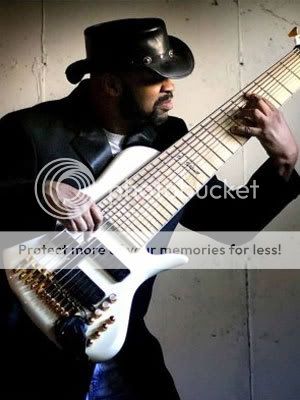
Mugician has been correctly described as an 11 string Fretless Bass Guitar synth. See the crazy picture of Al Caldwell playing an 11 string bass? That thing has frets on it! You can practice your way to very high levels of musicianship on Mugician. But that has nothing to do with whether or not it's "easy to play". It is a little easier than a real string instrument in that the fret width is uniform, but that's about it.
Table Of Contents
Expectation Management
Run away now if you want something that's easy to play!

Mugician gives you:
- Too much octave ran
 ge
ge - The ability to play totally out of tune
- A small amount of help on playing in key
- A somewhat ugly interface
- A small set of features that you must combine to make variety.
- No bitmapped images to make you drool over the eye candy
- Not a font anywhere - other than a few begrudgingly penciled in note names
- I have never had a crash report, but the code is a seething mess of chaos, magic numbers, the intersection of a bunch of exponential curves and feedbacking into sound buffers. It could have been the sane approach of an electrical engineer, of which I am neither. But I am working on it. What this means to you is that I say "no" a lot; even to The Big Fish. This is something that I am a little apologetic about. I'm starting clean with a lessons learned instrument soon anyway.
Why Is Mugician Different?First note that a png *screenshot* (95k) of Mugician (48k) is 2x larger than the software itself!
Mugician is tight and minimal, and cares about nothing other than expediency.
There are some sacred unwritten rules that you get pressured into following:
- Look like an animated bitmap of a real instrument! Realistic! Familiarity!
- Take a rounded-scissors approach to musicianship and help the user with scales, tuning, and timing!

- It should not seem like the author is some dude that once had his shoes vomited on at a metal show.
Musicianship is a never-ending process that you should make a central part of your life, or just abandon. Real musicianship is hard. So you will see that I try to keep things expressive by making sure that there are as many dimensions of expression as I can cram into the given space, and that parameters are always reachable and easily combined in real-time. For me, expressivity always wins in the struggle with ease-of-use. I think of Violin as the most obvious example of this principle. For a real instrument, doing anything else leads to mediocrity.
I am glad to see that this attitude
is starting to change in the app store now; and applaud moves towards instruments for professional musicians. In the real world, good playability is so far above familiarity in terms of usefulness that it should almost be coincidental if your instrument doesn't look like it came from Mars.
After it takes over the world, then it won't seem so strange. Who was complaining that the iPad was nothing like a laptop?
The UglyAmost all written reviews are 5 star reviews. I had a bad release (1.6) that you may be aware of. But these are the three worst reviews ever, my only one and two star reviews:
- * "Oh my gosh! I can't believe how much this amazingly cool and musically powerful app has been destroyed by the update today! ..."
- ** "This was one of my BEST apps on the iPad and I was ALL praise for it until this absolutely HORRID update!!..."
- "... It's not stageworthy anymore!!!" (ie: I am using 1.5 on stage!)
I thought about it a bit, and was flattered in the grand scheme of things. This was just one bad release, and they were right in their criticisms. Some of my critics helped me out. It's very uncommon for anybody to be using a real iPad instrument in a serious gig; and it is mine. Overall I get good reviews, in spite of the fact that even non-musical grandmas do download and rate it just because it's free.
The Fix1.7 is out. The critical feedback I get on its sound is pretty good. I am not getting negative feedback on the bugs that I know of in 1.7. I submitted 1.7.2 to Apple to fix the sound issues that I know about (and have played with these fixes for a long time now). I am really pleased with the 1.7.2 sound. I have been told that its shortcomings are pretty minor: very slight latency, and the reverb is much improved - but not great.
Keep sending in the criticism! I will listen, especially if you will help me to make the fix happen, through testing or being usefully specific about what is terrible. It's usually the first time I hear from people using it.
It lets me know that you actually care about the project when you scream in pain when something breaks. I respond to every email. However, I will love you more if you vent to me over email, rather than socking me with a one star rating for previously having the greatest instrument ever and then running away. (One star instruments make fart noises... C'mon!)
My Goals BeyondIf only two or three rock megastars use this instrument frequently and
nobody else cares, then I have done what I set out to do. There are plenty of instruments out there that people play for a few days and move on to something else, but I am not interested in anything that won't be getting use in the real world. Real world instruments get an investment of hundreds of hours of practice by their owners. The big fish are the ones that change the sound of music, so I am trying to start there. I
do intend to help change the sound of music by making microtonal (quartertone) play much more practical.
Now: Imagine you and your friends catching cheap flights to another country with nothing but your iPads in backpacks, which you have for other reasons. And do a gig by jacking into the local PA system when you arrive. That's the other thing I am up to. I already did something like this as a Manhattan day trip with Leon Gruenbaum's band, Genes and Machines.
Mugician is my personal instrument that I let other people play, and try out new things with. I'm not going to go so far as to say that I don't owe anybody anything because it's free; which is *not* true because a lot of people give me their precious time! And the one person who has given me the most time of all is the already ridiculously busy Jordan Rudess himself; I owe him something really good.
(Note that if you buy a $2 app, then you really have the right to $2 worth of support...still next to nothing! :-) ) But I pick and choose my battles without a whole lot of fear about what anybody will think in the short term, and don't spend
any time on stuff that only demotivates me. When I have an app that's for sale, I will behave more like a guy with a product.
Crazy LimitationsIt originally had only two controls: distortion and reverb. At the time, contemplating a manual was an absurd idea. I was going to do this as a prototype to figure out what my real instrument needed to be. I avoided UIKit for the graphic part and went straight for the lowest-level OpenGL because I could just could not hit my latency numbers in my OSX instrument "Xstrument" until I started straight writing to the graphics card. It's ugly, but who in their right mind *really* cares about that. The only thing that I have cared about, or will care about, is the final sound
of the person playing it: the end result of sound quality, ergonomics, and latency.
Mugician changes are wrapping up because I just can't keep adding controls all over the screen space... there is barely enough to make a workable instrument with keys large enough for your fingertips. In the real-world, a maze of menus is an abomination; if you can, make everything feel analog so that you can morph between any two settings.
This isn't necessarily a bad thing. Until you can download old versions of apps from Apple, it will only drive people crazy if they are trying to gig and I am constantly pushing Mugician updates and forcing them to deal with sound changes.
Just Shut Up And Describe The Heiroglyphics KTHXBYETHE MOST IMPORTANT ONE IS THE LAST SLIDER -- THE LOCK AND PRESETS. THAT'S WHAT YOU ARE LOOKING FOR IF YOU THINK 1.7 IS BROKE COMING FROM 1.5!
- Overall Volume - When I added support for playing along with your iTunes music (yes, you can... just start a song from iTunes, exit iTunes and enter Mugician...quickly double-click the exit button to bring up the song to stop it, etc... it's standard iPad behavior for apps), I discovered that iTunes's volume control is in lockstep with the overall volume, meaning that I had no way to mix the volume level of iTunes with Mugician. Also, as a side effect, this volume control does some compression to prevent clipping. You can think of it as a volume control that's a very light distortion pedal that can distort the final sound - reverb, echoes, and all. Keep a bunch of gap-less mp3 drum tracks in your iTunes collection so that you can practice Mugician to drum tracks!
- Reverb -
 I really expected professional musicians to roll their eyes at on-board effects, but it turned out that everybody thinks that having them on-board is important. I do agree with this sentiment from the standpoint of practicing, and playing with your practiced sound now. It's not a real reverb, but random echoes that are fed back into themselves. It's an animation of a ball bouncing around in a box... what reverb basically is.
- Distortion -
 This is a typical "arctangent" distortion. It's compression. It smoothly turns sine waves into square waves, so the picture is a square wave.
- Octave Harmonics -
 This is a component of the sound that is an octave overtone. It is critical to getting the sound to be guitar-like, or organs to sound reasonable.
- FM Distortion -
 Rather than a compression distortion, this is a modulation of the frequencies to give a rich set of harmonics. It can act as a sort of wah sound. When you look at FM in an oscilliscope, it does in fact look like the picture. When you combine it with the other distortion, you can get a really meaty sound that you can't get out of a real instrument, because physical strings don't do FM. If you have the special build, then that feature is tied tightly to this value. It's the secret sauce of a simple but flexible sound.
- Delay -
 For the sake of ethereal playing and practice, on-board delay is here. It's split into three parts. Tap out the rhythm on the first part, and it will flash in proportion to how far to the right the middle part is. That middle part is delay feedback. The third part to the right is the volume of this whole delay. However, don't look at the flash and count in your head when doing it, or you will be confused...Just count in your head while you tap and ignore the flashing. In 1.7 I have a minor issue in that it flashes at the right delay interval, but at some random point in the measure.
- Pitch Rounding / Optional Frets -
 This was a Jordan Rudess suggestion that everyone had been trying to beat into me from day one. In fact, it's a lot like the pitch handling in his Morphwiz program - which you no doubt went out and bought! Mugician started out as a 100% fretless instrument, to make it a viable "microtonal" instrument. It had no frets, and it was up to you to play in tune, like a violinist. Obviously, that makes Mugician tough to learn, and the iPad's accuracy just isn't enough for this to be viable. So, at 0% play is completely fretless (good luck!) and no frets are drawn between the notes. Up to 25%, it snaps to the closest diatonic note if you are within a quartertone of it. It draws the frets green at this setting. It won't round if you move after initial hit, and if you completely miss the diatonic, it will just play exactly what you did. This allows you to play middle-eastern style quartertone scales more or less correctly - simplifying it by snapping non-quartertone pitches to the 12-tone equal temperment scale as a compromise approximation. Above 25% it's fretted, but how far the slider is determines how quickly it drifts to the closest diatonic. This greatly affects your ability to bend notes or to sound like you are moving your finger across frets.
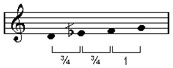
What on earth is this all about you say? Look at piano minor chords: B-flat D-flat, and E-flat G-flat. The black keys missing, if they existed as "red" keys would be a quartertone flat - and 5 black plus 2 red k eys are a 7 note Arabic style scale that is not even tempered, while the white keys are the common 7 note western scale. It's more complicated than that, but this is how you should think of it at first. Approximate quartertone scales are not a freaky experiment, but something with a long history behind them, that you should have in your arsenal of scales. This is an especially interesting way to express yourself when the rest of the music is a simple pentatonic scale.
- Polyphony Adjustment -
 This is another Jordan Rudess suggestion. Ugly drawing of music chords here? You betcha. Besides frets, the other thing you need to play fast is to be able to have a monotonic mode. Below 25%, it's monotonic play that stacks notes in the order played, so that you can use the multi-touch to play faster monotonic by doing trills and hammer-ons... a common string instrument technique. However, you can trill up or down because it's not a real string. Above 25% this applies per row, where a row is like a guitar string. Above 75% it's just totally polyphonic, which allows you to play compact chords that are impossible on a guitar, because you can play multiple notes on a string.
 - Preset and Lock -
 Presets are for the weak! But aren't we all! :-) Did you notice the red-flashing X on the lock when you start Mugician? This feature is necessary if you play an iPad on stage, have multiple apps, and need to switch between the apps quickly to get through a song. It is split into two parts. The left part is a slider to pick between 12 presets. When you slide it around, you pick a set of slider settings. Initially, all the controls are grayed out and not changeable. That's because they are SAVED TO DISK like that. The right side is the lock. Slide it down, and the colors turn on. So: slide lock shut to save current setting to disk and make it the one that comes up when you start Mugician. Slide the lock to the left to unlock it so that you can mess with the setting.
TechniqueA lot of players play with one hand. Right-handed guitar players are typically doing everything with their picking (right) hand. Pianists seem to do the same. I play two-handed finger-tapping technique, which seems to be best way (I have tried everything).
I have a bit of an advantage in being left handed, because chords are easier to play with the left-hand due to the fifth being most playable with the middle finger when first and third are both on same string. But the fretboard vision is right-handed as most players are used to...just the upside-down fret-hand seems to make it less natural.
I play scales with two fingers on left hand, and one on right hand. I presume that right handed players do the opposite. Arpeggios are easier to play with the left hand as well due to finger posture.
Bugs - iOS 4.2
- Sometimes (rarely) when waking from sleep, the sound is gone! I have to exit and re-enter Mugician to get sound. This issue seems to affect a lot of instrument, not just Mugician, even some that were programmed with knowlege of 4.2 (ie: work on phone as well). Cheap Workaround: Just save sound where it is at if you don't mind saving at current settings, get out and and pop back into Mugician in a few seconds.
- Performance is not identical, and Mugician's reverb was written to use as much CPU to make the reverb beautiful as it could afford. The budget was computed for iOS3.2, but in iOS4.2 there are occasional skipping noises if reverb and echo are turned on during polyphonic play. If you run through an external effects unit to get your reverb and echoes, and turn Mugician's Reverb slider all the way to its lowest setting then you will no longer get skips, and get better latency as well. The only way to fix this that I can think of right now is to cheapen the reverb (make it sound a little worse) so that the sound never skips. The echo isn't as expensive as the reverb, so you can probably leave echo in and make the skips go away.
- If you are a pro: I have been saying it for a long time: use external reverb/echo/distortion when you are not practicing if possible. You will get a better sound, and have more effects available.
Credits- Jeffrey Shaffer, White Rainbow (Adam Forkner), Michael Vick (the microtonal guitarist one), Travis Nicklow, Vitaly Newman, Leon Gruenbaum, and Jordan Rudess actively contributed sound vetting and feedback (or will be) for the 1.8 release. Others have gotten builds and tested (presumably without incidents to report?). Jean Babtiste Collinet has been invaluable in inumerable ways; so valuable that I had to take what I learned from him and start my new instrument Pythagoras based on it. (I hope to feature him in the center of the Pythagoras world when it's released.)
- Brandon Sullivan got me some cash for my efforts, and was the first to do so since Mugician went free. Jordan has paid me in many ways, including the tickets and backstage passes for the last day of Iron Maiden's US tour - it was a very happy coincidence that they were in my town at exactly the right moment. Chris Dudley did a similar favor for me as well.
- Thanks to some of my real world end users: Chris Dudley of Underoath, who used version 1.5 on his latest album and uses the latest version on stage. Steve Sweney used version 1.5 in a live show (I have no idea if he still uses it). There are lots of people telling me that they do or plan to use it recording and live - I just haven't seen the videos for myself though.